Search verified construction activity in seconds
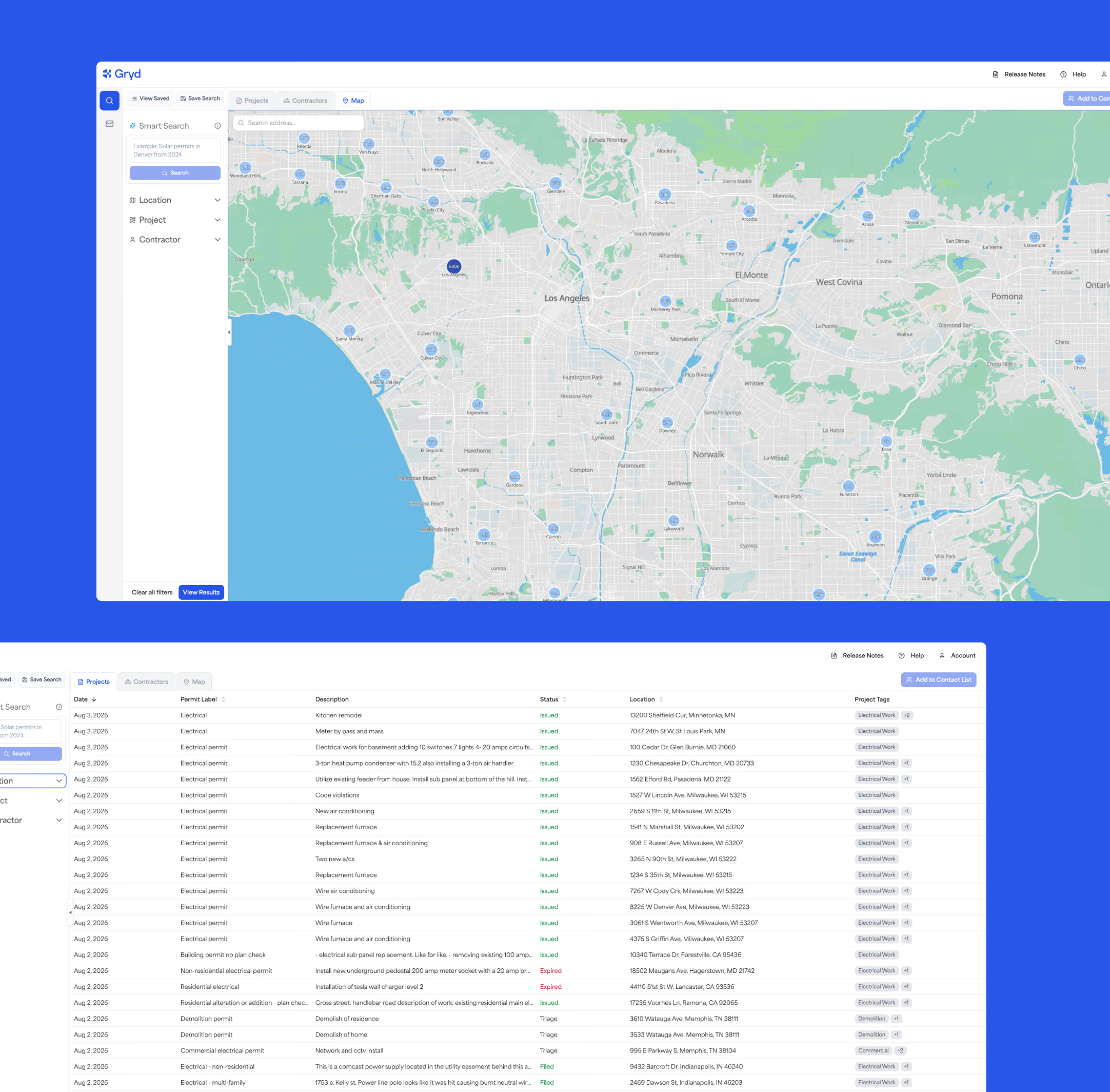
Gryd Explorer gives you direct, searchable access to jurisdiction-verified permit, property, and contractor records — 400M+ permits, 6.5M+ contractors, and 100M+ properties across 2,500+ jurisdictions, updated weekly.
Permit records exist. Finding them shouldn't take all day.
Public construction records are scattered across thousands of local systems, each with its own format and update schedule. Gryd Explorer pulls them into one searchable place — so you're working from documented activity, not outdated lists or manual lookups.
Stop checking permit portals one jurisdiction at a time
Gryd aggregates records across thousands of local building departments so you can query nationwide instantly.
Catch new permits and status changes before your competitors do
Our weekly refreshes ensure you know about new construction and project applications as they drop.
Confirm contractor activity with documented permit history
Validate contractor claims with physical records of pulling permits and completed works rather than self-reported lists.
Everything you need to search verified construction data
Easy Filtering
Search by state, market, city, zipcode, property type, project tags, and more.
Detailed Reports
Download project and contractor reports built around your exact search criteria.
Contractor Profiles
Review a contractor's documented work history and get verified contact information.
Tailored Location
Pinpoint projects and contractors down to the zip code level.

See how professionals use Gryd Explorer
Use the power of Gryd by BuildZoom Data's permit data to find specific projects to bid, or to find GCs whose projects are a great fit for your expertise.
- Find projects matching your specialization
- Identify active general contractors
- Track bidding opportunities
- Analyze market competition
Use the power of Gryd by BuildZoom Data’s permit data to identify active projects, track demand by trade or location, and find contractors who may need materials, equipment, or supplier support.
- Find active projects that match your product or service area
- Identify contractors working in your target markets
- Track demand by project type, trade, or location
- Prioritize outreach based on real construction activity
Use the power of Gryd by BuildZoom Data’s permit data to review property improvements, contractor activity, and construction history before making insurance, lending, or risk decisions.
- Review permit history tied to a specific property
- Identify renovations, repairs, additions, or system upgrades
- Verify contractor activity connected to permitted work
- Add construction context to underwriting or lending workflows
Use the power of Gryd by BuildZoom Data’s permit data to find better-fit prospects, understand market activity, and focus campaigns around real construction signals.
- Build prospect lists based on active permit activity
- Target contractors, properties, or markets by project type
- Identify growing construction activity in key territories
- Time outreach around recent or relevant construction signals
See the data before you sign up
This is an actual Gryd property report, unedited: permit history, project detail, and the contractors on record for a single address. Every free account includes 2 property reports a month, with no credit card required.
What's inside:
Property overview
Address, property type, year built, and the parcel details on record
Permit history
Every permit filed on the property, with dates, type, and current status
Project detail
Scope of work, declared valuation, and stage for each project
Contractor profiles
Who pulled each permit, their license status, and documented work history
Source and recency
The issuing jurisdiction behind every record, and when it was last updated
Gryd Explorer Pricing
Gryd offers different ways to work with construction intelligence depending on your team's goals, workflow, and scale. Some teams need a searchable platform. Others need API access, bulk data, or a custom data solution.
Free
Individual
Explore the Gryd map and research individual properties.
Free
With Free get:
Access 2 property reports
Search by Address
View property report details including permit history
No Credit Card Required
Core
Individual and business
Search multiple properties, projects or contractors at once.
Starting at
Everything in Free plus:
Access 50 property reports
Location and Project Search
View a list of properties and project details
Month to Month subscription
Virtual Customer Support
Pro
Business
Get higher volumes of data, advanced search capabilities, custom reports and alerts.
Starting at
Everything in Core plus:
Access to Smart Search and Contractor Searches
1000 record downloads per month
Create saved searches and get automated weekly alerts
Create a custom list of contractors by trade specialty, license status, recent projects
Premium
Business
For teams that need multi-state or national data with options to receive the data in bulk or through an API.
Tailored solutions
Multi-State or National Data Access
API available
Bulk data delivery
Custom Integrations
Need more than search?
Explorer is built for searching and reviewing records directly. If your team needs construction data connected into a product or system, or needs data at scale for modeling and analysis, Gryd also offers API Access and Bulk Data Delivery.
API
Connect Gryd data to your product, platform, model, dashboard, workflow, or internal system.
Bulk Data
Receive large-scale construction, permit, property, and contractor data for analysis, reporting, modeling, or research.
Ways financial services and lending teams use Gryd
Ready to use Gryd Explorer? Here's a quick guide to your first search after you sign up.
Step
Set project location filters
Search broadly at a state or market level, or more narrowly by cities and zip codes
Step
Select project recency
Filter projects from the last 6 months. Need deeper history? Contact us about full 25+ year access.
Step
Select project types and trades
Looking for specific types of projects or contractors? Select Project Tags and/or Trades
Step
Choose Projects or Contractors tab
Decide if you want Project records or Contractor details and contact information
Step
Run your search
Pro tip: Save your search so you can easily pull it up next time
Gryd Explorer FAQs
Question
Answer
Is Gryd Explorer really free?
Yes. Basic search, map filtering, and individual record lookups are completely free with no credit card required.
How far back does the data go?
We maintain over 25 years of building permit history, giving you access to extensive historical property and project records.
How often is the data updated?
Gryd Explorer refreshes permit and construction databases weekly, bringing in over 1.3 million new updates every cycle.
Can I export what I find?
Yes. You can export filtered project and contractor lists as Excel or CSV reports straight from the Explorer dashboard.
What's the difference between Explorer, API, and Bulk?
Explorer is web-based. API allows programmatic lookups inside your tools. Bulk Delivery provides large-scale datastore files for system ingestion.
Do I need a credit card to start?
No credit card is required. You only need a verified work email to set up your free Gryd Explorer account.
Start searching verified construction activity today
Create a free account and run your first search in minutes — no credit card required.