Search and filter construction activity to your specific needs.
Gryd gives teams flexible ways to search, connect, and analyze permit, property, contractor, license, and project activity data. Use Explorer to search directly, API to connect Gryd data into your systems, or Bulk Data to work with large-scale datasets in your own environment.
Turn building permits into easy to use lists.
Figuring out how to access building permits at scale can feel like a project of its own. Sometimes your team just needs to look up a property, review a contractor, check permit history, explore a market, or confirm whether activity is happening. Gryd Explorer gives teams a faster way to work directly with building permit data and contractor profiles, without waiting on a technical workflow.
Manual research takes too long
Local permit portals, contractor records, and property details are scattered across too many sources.
Public records are hard to compare
Each jurisdiction may report data differently, making it difficult to review activity across markets.
Teams need context quickly
A property, contractor, or project record is more useful when you can see the related activity around it.
Not every user is technical
Some teams need to search and investigate directly, not work through an API or data warehouse.
Search, filter, and investigate construction activity in one place.
Data Explorer helps teams move from scattered records to usable answers. Search by market, property, contractor, permit, project type, or activity signal to better understand what is happening and who is involved.

Search permit activity
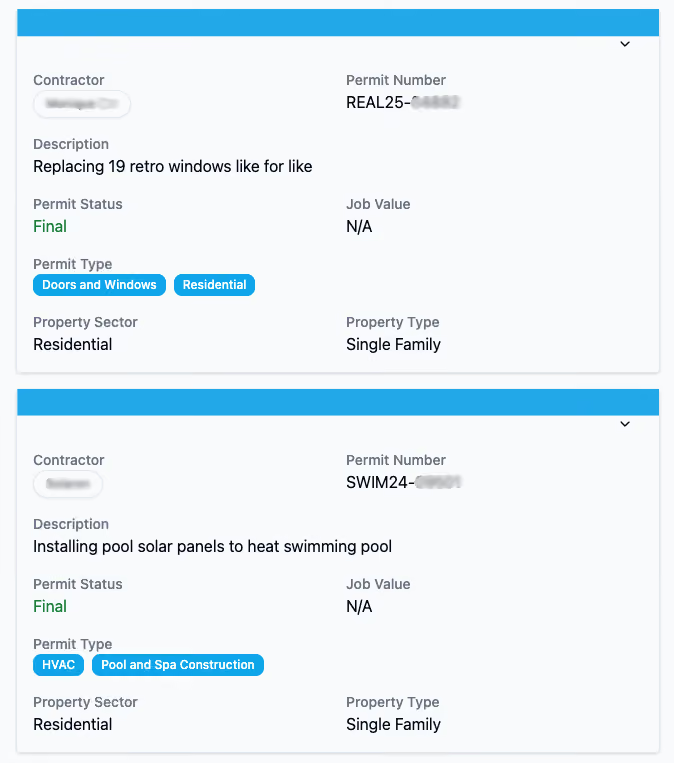
Review permit records tied to construction, renovation, repair, solar, roofing, HVAC, electrical, plumbing, additions, and other project types.
Review property changes
Look at permit history and project activity to better understand how a property may have changed over time.
Explore market movement
See where construction activity is happening across locations, trades, project types, and time periods.
Investigate project details
Review available project descriptions, permit status, job value, timing, address, contractor, and related activity.
Find active opportunities
Identify construction signals that may point to sales, lending, insurance, research, or market development opportunities.
Explorer is best for teams that want to search and view Gryd's building permit, property and contractor data directly.
Explorer is the right starting point when your team needs a hands-on way to explore construction intelligence before deciding whether to connect the data into a larger system.
Explorer is a good fit if your team wants to:
Get to verified construction signals faster
Gryd gives buyers and technical teams clear ways to understand the data, evaluate coverage, and learn how construction intelligence can support risk, growth, and automation workflows.

Move faster than manual research
Search across structured construction data instead of chasing local records one source at a time.
See more context around each record
Connect permits, properties, contractors, project details, and market activity in one place.

Reduce blind spots
Use documented permit and contractor activity to support decisions that depend on what has changed, what is active, or who is doing the work.
Start without a technical build
Give business users a direct way to explore Gryd data before investing in deeper integration or bulk analysis.
Ways teams use Explorer
Property Risk Intelligence
Use permit history, property changes, contractor activity, and project records to understand how a property has changed over time.
Contractor Verification
Review contractor activity, permit history, license-related signals, project records, and market presence.
Construction Lead Generation
Find active projects, high-volume contractors, and better-timed sales opportunities using verified construction activity.
Nationwide Permit Coverage
Access broad permit activity across markets and jurisdictions without relying on local searches one by one.
Construction Activity Monitoring
Track recent permit activity, project updates, contractor movement, property improvements, and market changes over time.
Built for teams that need answers from construction activity

Insurance & Underwriting
See property changes, permit history, contractor activity, and improvement signals that can support better underwriting, renewal, and risk decisions.

Financial Services & Lending
Verify contractor activity, support KYB workflows, monitor construction loans, and add property context to lending decisions.

Real Estate and Property Tech
Use permit and property activity to enrich platforms, understand market movement, and build stronger property intelligence.

Construction & Building Supplies
Find active projects, high-volume contractors, growing territories, and construction activity your sales or market team can act on.

Construction Technology
Build products, workflows, AI tools, and platforms on top of normalized construction, permit, property, and contractor data.

Research & Academia
Analyze national construction activity, housing trends, energy adoption, permitting patterns, and long-term market changes.

Telecommunications
Identify buildout opportunities, support site acquisition, monitor competitive activity, and protect infrastructure with verified construction data.

Energy & Utilities
Assess solar installation feasibility, track technology adoption, and support certification and research with verified property data.
Not sure if Explorer is the right access path?
Explorer is best when your team wants to search and investigate directly. If you need to connect Gryd data into your systems or analyze large datasets in your own environment, check out our API or Bulk Data solutions.
Access Path
Best For
Common Uses
Explorer
Searching and reviewing data directly
Property lookups, contractor review, permit history, project research, market monitoring
API
Connecting data into systems
Product enrichment, workflow automation, contractor checks, risk models, internal tools
Bulk Data
Large-scale data analysis
Large-scale data analysis
Explorer FAQs
Question
Answer
What is Gryd Data Explorer?
Data Explorer is a web-based platform where you can search, filter, and review permit, property, contractor, and project activity directly, without building an API integration or requesting a bulk data file.
Who is Data Explorer best for?
Teams that want to search and investigate data directly: reviewing a specific contractor, researching a property, exploring a market, or building a list, without a technical setup.
Can Data Explorer help with property risk research?
Yes. You can search a property's permit history to see documented improvements, renovations, and repairs tied to that address.
Can I use Data Explorer to review contractors?
Yes. You can search by contractor to review their permit history, license status where available, and project volume within your search criteria.
Is Data Explorer the same as API Access?
No. Data Explorer is a web interface for direct search and review. API Access connects the same underlying data into your own systems, platforms, or workflows for real-time use.
Can my team start with Data Explorer and use API or Bulk Data later?
Yes. All three access paths run on the same dataset, so many teams start with Data Explorer to explore the data, then move to API or Bulk Data Delivery as their needs scale.
Ready to search verified construction activity?
Tell us what problem you are trying to solve, which markets matter most to you, and how you want to access the data.